

Where to Get It:
- You can also find the Suunto watches on Amazon.com.
What’s Included:
- Suunto M2 watch
- Suunto Dual Comfort Belt heart rate monitor
- Several instruction manuals in several languages
The Suunto M2 Watch Review:
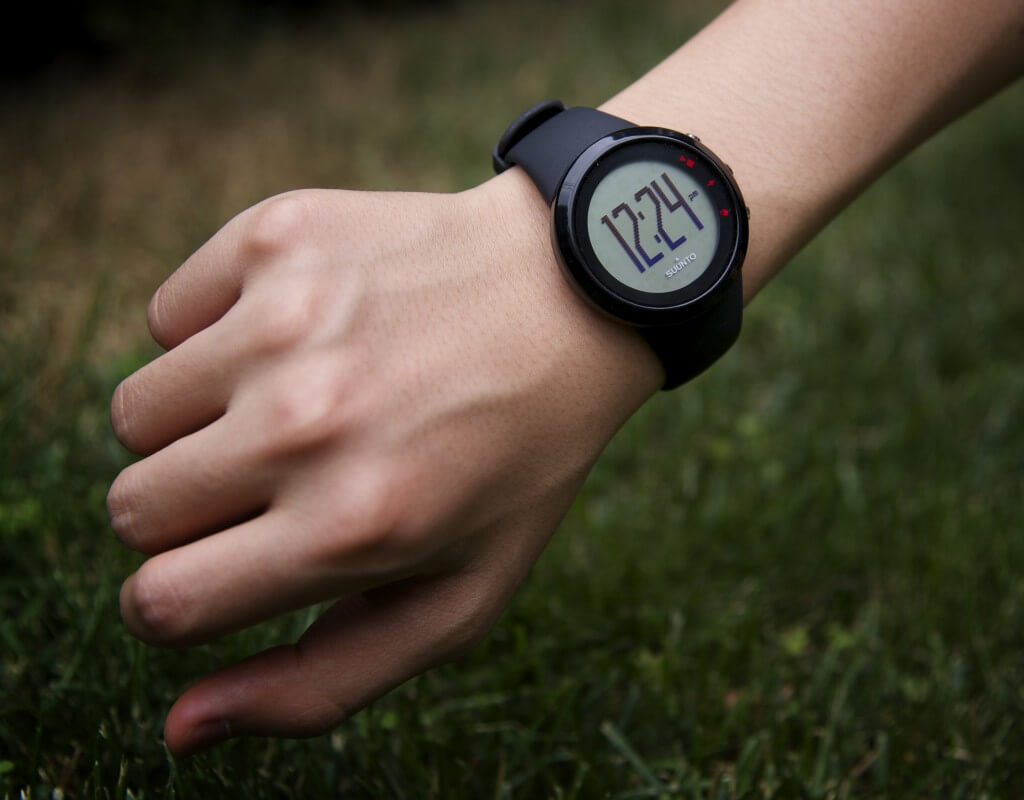
After skimming through the instruction manual, I got the Suunto M2 watch up and running with ease. Suunto M2 watch comes in several colors including fuchsia, however I chose the plain black one. The watch has a sleek display and 3 silver metallic buttons on the left side of the face. The strap is easily adjustable and made of plastic with a metal buckle.

Pros:
- Sleek design
- Heart rate monitor
- Easy to connect heart rate monitor to watch
- Records workout history including workout timespan, average heart rate, max heart rate
- Relatively easy to use
- 1 daily alarm – you can set the alarm in the settings area
- Easy to change battery
- Water resistant 30 meters
- For both Men and Women
The Suunto M2 has a sleek and low profile design and I like how the display is arranged. The instructional manual was straightforward and included some diagrams. Since there aren’t too many features in this watch, it was easy to figure out everything the watch could do without having to study an instructional manual.
You can easily change the watch’s battery by using a coin to pop the battery cover off and replace the battery.
I had difficulties trying to connect the heart rate monitor to the watch at first, but then I realized that I had to make the sensors moist. After that, I was impressed how easy it was to connect the heart rate monitor to the watch. The Suunto M2 watch comes with the Suunto Dual Comfort Belt heart rate monitor. Each has their own battery the watch searches for the heart rate monitor’s signal when you enter the ‘exercise’ mode. After the monitor and watch have paired, the watch will start to display your current heart rate.
I haven’t been able to test the accuracy of the heart rate monitor, but I would assume that it is pretty accurate, since I can feel and see that my heart rate changes depending on my activities. It took a while for me to get used to wearing the Suunto Dual Comfort Belt, but eventually it almost becomes a part of you, and you start to forget it when you run.
After timing your workout duration, you can save the workout, then re-access the data of that workout at a later time. The watch logs your workout duration, average heart rate, max heart rate, the amount of calories your burned (depending on the weight and age that you selected when first choosing the settings on the watch) and in what ‘zones’ you did your workout in.
The zones are a way to measure the intensity based off of your heart rate. For example, a rough estimate is that zone 1 is somewhere between 100 BPM (beats per minute) and 125 BPM, while you are working out in zone 2 when your heart rate is at a higher level. In total, there are 3 zones, zone 3 being the most intense.
Cons:
- No backlight
- No lap splitting
In general, the Suunto M2 watch doesn’t do much more than tell time, determine your heart rate and time your workouts. While there is a lack of features in this watch, it hasn’t been a big deal for me since I have other devices, which can do similar things. For example, almost every electronic device that I own has a stopwatch that can split laps: my iPhone, my tablet, and my computer.
While running, I wasn’t able to split my laps like I could with my Timex Ironman Sleek watch. Usually when I run, I like to split the total time of my runs into smaller chunks. For example, I might run 5 miles and want to record the time that I took to run each mile. On other watches, after I would run each mile, I could press a button to indicate that I had completed the lap and to save the time that it took for me to run that specific mile. The Suunto M2 can’t do that, which made it more difficult for me to measure and analyze my run times.
I was a bit disappointed that Suunto didn’t include a backlight to illuminate the watch face. The numbers on the face of the watch are extremely difficult to read when dark, meaning it will be almost impossible to see the display when running at night or at/before dawn. Though I tend to run mainly during the daylight hours, it would still be nice if Suunto added an illumination feature.
There aren’t too many features in the Suunto M2, however the lack of features makes the watch simpler to use.

The Verdict:
The Suunto M2 watch does what it was meant to do well, however it falls short in terms of features. The watch is generally easy to use, but I really didn’t like the fact that the watch didn’t have a backlight. Overall, this is a basic fitness watch, which tells time, monitors heart rate, and records workout times – nothing more, and nothing less.
The watch costs retail $129, which is a bit expensive considering the amount of features in this watch, you can get it for a bit less on Amazon.com.
-
Style - 8/108/10
-
Features - 5/105/10
-
Usability - 9/109/10
-
Durability - 7/107/10
-
Value - 7/107/10
Where to Get It:
Note: This watch has since been discontinued, for other Suunto watches and updated fitness watches, check out the Suunto 3.
- You can also find the Suunto watches on Amazon
Do you have a question about this product, anything else to share? Leave your comment below.
The Suunto M2 watch was provided for this review. As always, this review contains only my honest views and opinions.
Só tenho que agradecer pelas suas observações sobre o Suunto M2. Estava para comprar um, mas realmente fiquei com um certo receio. Principalmente porque queria um monitor com boa precisão no monitoramento cardíaco, já que apenas começando com as corridas.
I have a Suunto M2 watch which I purchased last fall. I have been very happy with it but recently I have been getting some very high heart rates at times which I know are not correct. After a while it returns back to normal. Any ideas what is wrong?
You are getting atrial or ventricular fibrillation would be my guess since I had the same and had it checked out to confirm. Medication available to control it.
I brought mine as I thought it would be the easier to use and had the features I needed. I really just wanted to use while walking so just needed distance ,steps and calories for walk. I cant work out how to just do that …function wise don’t want to use heart monitor at the moment either. Looks like I have to use it to get the data I want……so I am disappointed. Can someone tell me how to use it for my basic needs…step by step what buttons do I press etc. thanks. Have read instructions and manual but these really don’t cover basic steps……like going for a walk etc.
Tengo un rejo suunto modelo M2 pero tengo siempre problema con el pulsometro no se me conecta al reloj muchas veces , pensé que era la correot me compre una nueva y la nueva no la puedo conectar al reloj , por favor necesito que me ayude , que puedo hacer ??
Comprei um M2 de uma amiga com pouco uso só que não estou conseguindo zerar os dados dela…gostaria de saber se alguém de vcs pode me ajudar.